
Parents and students can use Skyward Family Access to monitor student grades, message with teachers and other school faculty members, and even view your teacher’s assignment calendar for upcoming due dates. Skyward Family Access is a valuable tool to stay current in your child’s academic life. Skyward can be accessed online and via a mobile app on your smartphone. We encourage all parents to register and utilize this valuable resource!
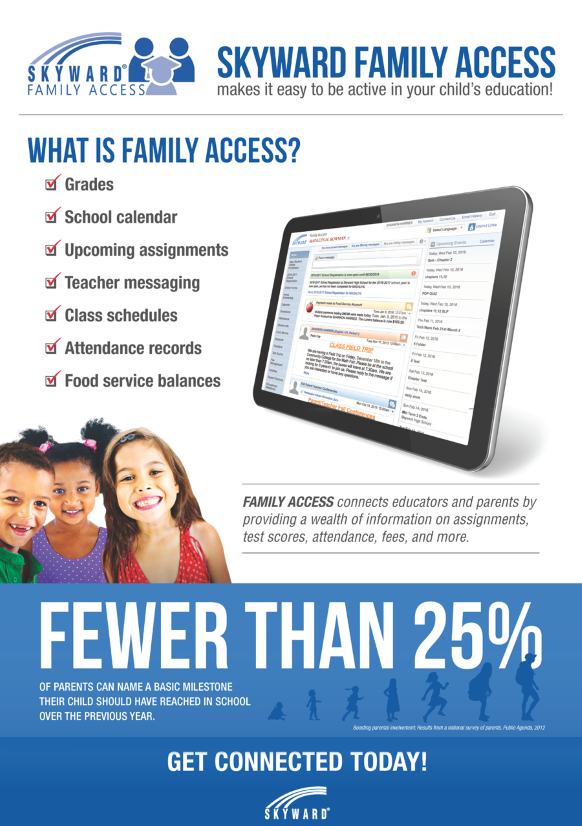
Skyward Family Access
How to get a username/password for Skyward Family Access
How to get a Username and Password
Before you can use Family Access you must have a Username and password for your new account:
- Fill out the School Family Access form
- Go to your child’s school to have your account activated by showing a picture id for verification
Where to find Skyward Family Access
The Family Access Portal can be accessed at: https://myportal.stlucie.k12.fl.us/family
Once there, please bookmark the site or add it to your favorites for easy access.
Your new username and password should work, but in the event you have a problem, please contact your child’s school for assistance.
Features in Skyward Family Access
Be sure to check our guide for a more in-depth overview of all that is available in Family Access!
Frequently Asked Questions
Are all of St. Lucie Public Schools using Family Access?
Each school provides Family Access as a service to parents and guardians, but the information provided by each school will vary depending on the age of the student and the type of information available.
I have more than one student in the district, will I need multiple accounts/passwords?
No. Using one account/password, you can access records for all of your students, even if they are attending different schools within the district.
When I log on to Family Access, I lose my connection after three to five minutes. Why?
Family Access has a default security setting that will terminate your connection if your computer is idle for longer than three to five minutes. This feature is designed to protect against unauthorized access and can not be changed.
I have forgotten my username and/or lost my password, what should I do?
On the Login screen, please click the Forgot my Login/Password link. Fill in your email address and if you have an email address on file, then your username and password will be emailed to you. If you do not receive the email, or accidentally lock your account from too many login attempts, please contact your child’s school to assist you with resetting it.
With all the talk about Internet safety and security, how do I know Family Access is safe?
Family Access uses Secure Socket Layer (SSL) encryption as the security layer for data presented on the Web. This is the same encryption system used by sites that accept credit card numbers and other personal data that must be secure. Each individual, whether student, parent, or staff member, must be given a username and password and be designated as a member of a household linked to a student in order to view Family Access information.
Can I get my high school student's transcript through Family Access?
Transcripts are not available through Family Access. They may be requested through the Student Records Department.
Is there any information pertaining to lunch (free/reduced/does not qualify for meal plan)?
Your students’ current status is available in Skyward. However if you have not applied for a free/reduced meal plan, or would like to find out if you qualify, you will need to apply with Child Nutrition Services:
https://foodservice.stlucie.k12.fl.us/
https://foodservice.stlucie.k12.fl.us/
How do I gain access to bus information within Skyward?
Bus information is available at: https:/departments/transportation/
Are there curriculum links embedded within Skyward?
Within Skyward, there is a “District Links” feature that contains several quick links and one of these is a link to Curriculum Resources. These can also be accessed via the website at:
Parents and Students Resources
Parents and Students Resources
It should be noted that only students have access to these resources.
Is contact information available for teachers / ESE staff / resource teachers?
Contact information can be accessed in most cases from the School’s website. School website links are available at: Our Schools
This link is also available in Skyward, from the District Links dropdown at the top right.
HOW-TO VIDEO LIBRARY
60 Second Power-Ups
Power –Up: Account Settings
With Family Access, you can determine which alerts you receive about your child, how you’re notified, and in what language the information is displayed.

Power-Up: Calendar
Use your Family Access calendar to stay on top of your child’s important dates and reminders – from tests and due dates to field trips and sporting events.
Power-Up: Food Service
Don’t play ketchup with lunch accounts. Once you’ve mustard Family Access, keeping track of balances and purchases will be a piece of cake.

Checking Grades
With Family Access, you can get an up-to-date look at your child’s grades, upcoming assignments, progress toward graduation, and more…
Power-Up: Messaging
With the social media-inspired message center in Family Access, you can stay in touch with teachers, coaches, and administrators.

Power-Up : Mobile Food Service Payments
How convenient would it be to load your child’s lunch account right from your phone? Now you can, with Family Access.
Power-Up: Conference Scheduler
Parent-teacher conferences should be a no-hassle, no-sweat process. Now, you can use Family Access to view teacher calendars and reserve a time slot that works for you.
Power-Up: Push Notifications
Sign up for push notifications and receive an alert for everything from missing assignments to food service balances.